C++ Engine
Description
As a solo developer, I built a custom C++ game engine from the ground up with 2D and 3D physics, networking, multi-threading, and event system functionality all integrated with DirectX 11 and DirectX 12 rendering pipelines.
This project grew my understanding of core engine fundamentals, including low-level C++ programming, systems architecture, and real-time graphics.
Duration: August 2024 - Present
Technologies:
C++
HLSL
D3D12
D3D11
fMod
ImGui
2D and 3D Primitives

At the core of my engine is a robust geometry and collision library built from fundamental primitives. I implemented support for:
AABB2 / AABB3
OBB2 / OBB3
Discs / Spheres
Capsules
Cylinders
Planes
Convex shapes

For each primitive, I developed a consistent set of spatial queries including IsPointInside(), GetNearestPoint(), DoesOverlapWith(), and various RaycastVs... tests. Each shape also supports full transformation through translation, rotation, and scaling.
On top of these primitives, I implemented collision resolution and physics response systems. This includes penetration correction, impulse-based bouncing, and velocity transfer between dynamic objects.
These foundational systems became the backbone of the engine, supporting higher-level gameplay, physics interactions, and rendering features throughout production.
At the core of my engine is a robust geometry and collision library built from fundamental primitives. I implemented support for:
AABB2 / AABB3
OBB2 / OBB3
Discs / Spheres
Capsules
Cylinders
Planes
Convex shapes
DirectX Rendering
I began this engine in OpenGL, but quickly pivoted to DirectX 11 to better my understanding of graphics API and gain myself access to more rendering features.
After a year, I decided to also add D3D12 API to gain access to lower level programming and systems like Pipeline State Objects and Command Lists.
While integrating DirectX 12, I maintained support for DirectX 11, allowing me to choose based on the needs of a specific project. This also allowed me to practice engine architecture as I designed a Renderer class which could be utilized with either API.

Some key rendering features that I maintained are...
Shading and Texturing
Compute Shaders
Vertex Displacement Shaders
Blinn Phong and Diffuse Lighting
Render Targets and Post Process Pipeline
Buffer and memory management
I began this engine in OpenGL, but quickly pivoted to DirectX 11 to better my understanding of graphics API and gain myself access to more rendering features.
After a year, I decided to also add D3D12 API to gain access to lower level programming and systems like Pipeline State Objects and Command Lists.
While integrating DirectX 12, I maintained support for DirectX 11, allowing me to choose based on the needs of a specific project. This also allowed me to practice engine architecture as I designed a Renderer class which could be utilized with either API.
Event Sytem and Dev Console
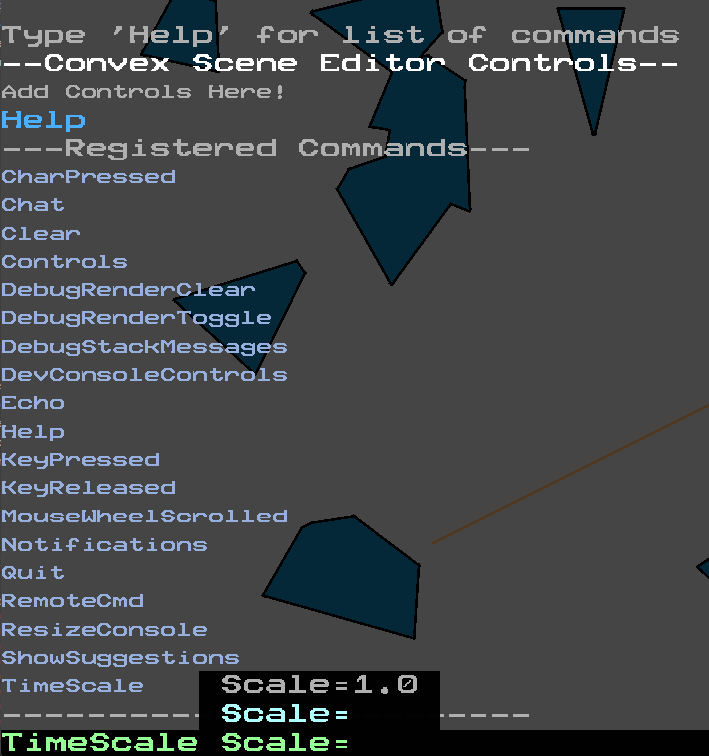
To improve developer workflow, I implemented a Dev Console and a global event system.
The event system allows functions to register against named events, enabling loose coupling between systems and flexible runtime execution. Events can be triggered programmatically or through the Dev Console, making it easy to test features without recompiling.
As part of the subscription model, events can define expected arguments with default or suggested values. These appear directly in the console, reducing guesswork and speeding up iteration.
To improve developer workflow, I implemented a Dev Console and a global event system.
The event system allows functions to register against named events, enabling loose coupling between systems and flexible runtime execution. Events can be triggered programmatically or through the Dev Console, making it easy to test features without recompiling.
As part of the subscription model, events can define expected arguments with default or suggested values. These appear directly in the console, reducing guesswork and speeding up iteration.
Input System
To support multiple game types built on the engine, I implemented a unified input system with full support for Xbox controllers and mouse and keyboard.
All input devices route through a common abstraction layer, allowing gameplay systems to query actions rather than specific hardware. This made it easy to switch between control schemes, support simultaneous device input, or enable split-screen multiplayer without rewriting gameplay logic.
By separating device input from game actions, the system remains flexible and scalable across different projects.
To support multiple game types built on the engine, I implemented a unified input system with full support for Xbox controllers and mouse and keyboard.
All input devices route through a common abstraction layer, allowing gameplay systems to query actions rather than specific hardware. This made it easy to switch between control schemes, support simultaneous device input, or enable split-screen multiplayer without rewriting gameplay logic.
By separating device input from game actions, the system remains flexible and scalable across different projects.